I was working on a pet project and had already created a Dockerfile for the ASP.NET Core container, along with a docker-compose.yml file to wire the services together.
Here’s the Dockerfile I had:
 1
 2
 3
 4
 5
 6
 7
 8
 9
10
11
12
13
14
15
16
17
18
19
20
21
22
23
24
25
26
27
28
29
30
31
32
33
34
35
36
| # [Choice] .NET Core version: 5.0, 3.1, 2.1
ARG VARIANT=3.1
# create a base runtime image with node
FROM mcr.microsoft.com/dotnet/core/aspnet:${VARIANT} AS runtime
EXPOSE 80
EXPOSE 443
RUN curl -sL https://deb.nodesource.com/setup_10.x | bash -
RUN apt-get install -y nodejs
# create a base SDK image with node
FROM mcr.microsoft.com/dotnet/core/sdk:${VARIANT} as sdk
RUN curl -sL https://deb.nodesource.com/setup_10.x | bash -
RUN apt-get install -y nodejs
# copy source files
FROM sdk as build
COPY src/ ./src
# install npm packages
#WORKDIR /src/Business.Web/Spa
#RUN npm install
#RUN npm run build
# restore nuget packages
WORKDIR /src
RUN dotnet restore
# run publish command
FROM build as publish
RUN dotnet publish -c Release -o /release --no-restore
# create release image from base runtime image
FROM runtime AS release
COPY --from=publish /release .
ENTRYPOINT ["dotnet", "Business.Web.dll"]
|
And the docker-compose.yml file:
 1
 2
 3
 4
 5
 6
 7
 8
 9
10
11
12
13
14
15
16
17
18
19
20
21
22
23
24
25
26
27
28
29
30
31
32
| # https://docs.docker.com/compose/compose-file/compose-file-v3/
version: '3'
services:
app:
build:
context: .
dockerfile: Dockerfile
args:
# [Choice] Update 'VARIANT' to pick a .NET Core version: 2.1, 3.1, 5.0
VARIANT: 3.1
image: business_web
environment:
- ASPNETCORE_ENVIRONMENT=Testing
- ASPNETCORE_URLS=http://+:80
- ASPNETCORE_ConnectionStrings__Db=Server=db;Database=Business.Web;User ID=sa;Password=V3ry$ecureP@ssw0rd;MultipleActiveResultSets=False;Connection Timeout=30;
# https://docs.docker.com/compose/startup-order/
depends_on:
- db
restart: on-failure
ports:
- "8080:80"
- "8443:443"
volumes:
- ~/.aspnet/https:/https:ro
db:
image: mcr.microsoft.com/mssql/server:2019-latest
restart: unless-stopped
environment:
- SA_PASSWORD=V3ry$ecureP@ssw0rd
- ACCEPT_EULA=Y
|
My biggest challenge was that even though I had set the app service to depend on the db service, the app service would still start before the db service was ready to receive connections. That led to .NET startup errors, crash loops, and eventually a failed container:
1
2
3
4
5
6
7
8
9
| info: Microsoft.EntityFrameworkCore.Infrastructure[10403]
Entity Framework Core 3.1.3 initialized 'DataContext' using provider 'Microsoft.EntityFrameworkCore.SqlServer' with options: None
crit: Microsoft.AspNetCore.Hosting.Diagnostics[6]
Application startup exception
Microsoft.Data.SqlClient.SqlException (0x80131904): A network-related or instance-specific error occurred while establishing a connection to SQL Server. The server was not found or was not accessible. Verify that the instance name is correct and that SQL Server is configured to allow remote connections. (provider: TCP Provider, error: 35 - An internal exception was caught)
---> System.Net.Internals.SocketExceptionFactory+ExtendedSocketException (00000001, 11): Resource temporarily unavailable
|
Because some initialization code and database seeding had to finish before the application could run, I needed the .NET code to start only after the database container was ready to receive connections.
After some searching, I found this answer on Unix StackExchange:
Testing remote TCP port using telnet by running a one-line command
I then needed to run that command before launching the .NET site, and only after the db server was ready to receive connections on port 1433. After some more trial and error, I landed on the following two scripts:
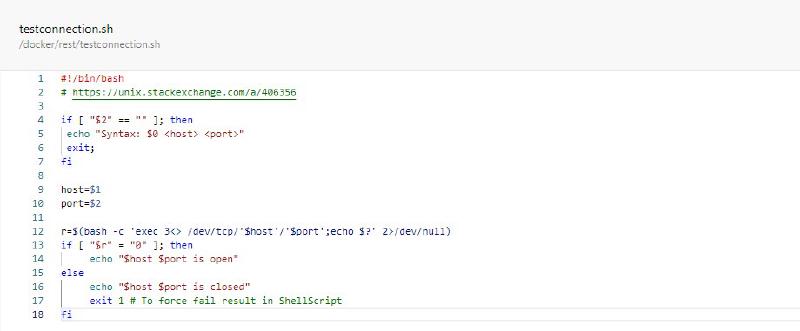
testconnection.sh is a copy of the code found on Unix StackExchange:
 1
 2
 3
 4
 5
 6
 7
 8
 9
10
11
12
13
14
15
16
17
18
| #!/bin/bash
# https://unix.stackexchange.com/a/406356
if [ "$2" == "" ]; then
echo "Syntax: $0 <host> <port>"
exit;
fi
host=$1
port=$2
r=$(bash -c 'exec 3<> /dev/tcp/'$host'/'$port';echo $?' 2>/dev/null)
if [ "$r" = "0" ]; then
echo "$host $port is open"
else
echo "$host $port is closed"
exit 1 # To force fail result in ShellScript
fi
|
entrypoint.sh is the entry point of the container. It checks the tcp port for readiness then executes the command for the container when the tcp port is open:
 1
 2
 3
 4
 5
 6
 7
 8
 9
10
11
12
13
14
15
16
17
18
19
20
21
22
23
| #!/bin/bash
set -e
# get the first two arguments
server=$1
port=$2
# check if we have 3 or more arguments
if [ "$3" == "" ]; then
echo "Syntax: $0 <host> <port> <command> [<arg>, <arg>, ...]"
exit;
fi
# use the first two arguments to test the tcp connection
echo "Testing connection to ${server}:${port}"
until ./testconnection.sh $server $port; do
>&2 echo "SQL Server is starting up"
sleep 1
done
>&2 echo "SQL Server is up - executing command"
# https://stackoverflow.com/a/3816747
# use the rest of the arguments to start up the container
exec "${@:3}"
|
Key points to note here are that entrypoint.sh uses the first two arguments for checking the tcp port and the rest of the arguments for container startup. So, instead of starting up our container this way:
1
| ENTRYPOINT ["dotnet", "Business.Web.dll"]
|
We will use the following approach instead:
1
2
3
4
5
6
| COPY entrypoint.sh .
COPY testconnection.sh .
RUN chmod +x ./entrypoint.sh
RUN chmod +x ./testconnection.sh
CMD /bin/bash ./entrypoint.sh db 1433 dotnet Business.Web.dll
|
When the services are started with this new dockerfile, this is what I got in the logs:
 1
 2
 3
 4
 5
 6
 7
 8
 9
10
11
12
13
14
15
16
17
18
19
20
21
22
23
24
25
26
27
28
29
30
31
32
33
34
35
36
37
38
39
40
41
42
43
| SQL Server is starting up
SQL Server is starting up
SQL Server is starting up
SQL Server is starting up
SQL Server is starting up
SQL Server is up - executing command: 'sh -c dotnet Business.Web.dll'
Testing connection to data:1433
data 1433 is closed
data 1433 is closed
data 1433 is closed
data 1433 is closed
data 1433 is closed
data 1433 is open
info: Microsoft.AspNetCore.DataProtection.KeyManagement.XmlKeyManager[64]
Azure Web Sites environment detected. Using '/root/ASP.NET/DataProtection-Keys' as key repository; keys will not be encrypted at rest.
warn: Microsoft.AspNetCore.DataProtection.Repositories.FileSystemXmlRepository[60]
Storing keys in a directory '/root/ASP.NET/DataProtection-Keys' that may not be persisted outside of the container. Protected data will be unavailable when
info: Microsoft.EntityFrameworkCore.Infrastructure[10403]
Entity Framework Core 5.0.6 initialized 'DataContext' using provider 'Microsoft.EntityFrameworkCore.SqlServer' with options: None
info: Microsoft.EntityFrameworkCore.Database.Command[20101]
Executed DbCommand (22ms) [Parameters=[], CommandType='Text', CommandTimeout='30']
SELECT 1
|
This solution let my app container wait as long as it needed before starting the .NET application.
Credits:
Testing remote TCP port using telnet by running a one-line command
How to pass all arguments passed to my bash script to a function of mine?