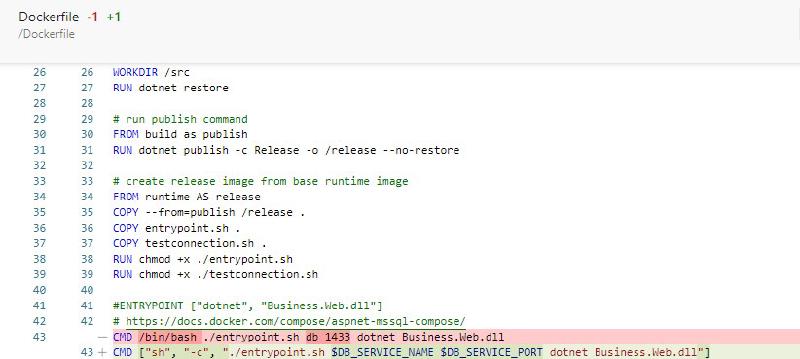
In my previous post, Waiting for Docker Service Container Port to Be Ready, I showed how I delayed container startup until another service was ready to accept TCP connections.
In this post, I build on that approach and make it more reusable by adding environment variables to both the Dockerfile and the docker-compose.yml.
Here’s the updated Dockerfile:
 1
 2
 3
 4
 5
 6
 7
 8
 9
10
11
12
13
14
15
16
17
18
19
20
21
22
23
24
25
26
27
28
29
30
31
32
33
34
35
36
37
38
39
40
41
42
43
44
| # [Choice] .NET Core version: 5.0, 3.1, 2.1
ARG VARIANT=3.1
ARG DB_SERVICE=db
ARG DB_SERVICE_PORT=1433
ARG PROJECT=Business.Web
# create a base runtime image with node
FROM mcr.microsoft.com/dotnet/core/aspnet:${VARIANT} AS runtime
EXPOSE 80
EXPOSE 443
RUN curl -sL https://deb.nodesource.com/setup_10.x | bash -
RUN apt-get install -y nodejs
# create a base SDK image with node
FROM mcr.microsoft.com/dotnet/core/sdk:${VARIANT} as sdk
RUN curl -sL https://deb.nodesource.com/setup_10.x | bash -
RUN apt-get install -y nodejs
# copy source files
FROM sdk as build
COPY src/ ./src
# restore nuget packages
WORKDIR /src
RUN dotnet restore
# run publish command
FROM build as publish
RUN dotnet publish -c Release -o /release --no-restore
# create release image from base runtime image
FROM runtime AS release
# https://github.com/moby/moby/issues/37345#issuecomment-400245466
ARG PROJECT
ENV DB_SERVICE=${DB_SERVICE}
ENV DB_SERVICE_PORT=${DB_SERVICE_PORT}
ENV ASSEMBLY=${PROJECT}.dll
COPY --from=publish /release .
COPY entrypoint.sh .
COPY testconnection.sh .
RUN chmod +x ./entrypoint.sh
RUN chmod +x ./testconnection.sh
CMD ["sh", "-c", "./entrypoint.sh $DB_SERVICE $DB_SERVICE_PORT dotnet $ASSEMBLY"]
|
And the docker-compose.yml file:
 1
 2
 3
 4
 5
 6
 7
 8
 9
10
11
12
13
14
15
16
17
18
19
20
21
22
23
24
25
26
27
28
29
30
31
32
33
34
35
36
37
| # https://docs.docker.com/compose/compose-file/compose-file-v3/
version: '3'
services:
app:
build:
context: .
dockerfile: Dockerfile
args:
# [Choice] Update 'VARIANT' to pick a .NET Core version: 2.1, 3.1, 5.0
VARIANT: 3.1
DB_SERVICE: db
DB_SERVICE_PORT: 1433
PROJECT: Business.Web
image: business_web
environment:
- ASPNETCORE_ENVIRONMENT=Testing
- ASPNETCORE_URLS=http://+:80
- ASPNETCORE_ConnectionStrings__Db=Server=db;Database=Business.Web;User ID=sa;Password=V3ry$ecureP@ssw0rd;MultipleActiveResultSets=False;Connection Timeout=30;
- DB_SERVICE=db
- DB_SERVICE_PORT=1433
# https://docs.docker.com/compose/startup-order/
depends_on:
- db
restart: on-failure
ports:
- "8080:80"
- "8443:443"
volumes:
- ~/.aspnet/https:/https:ro
db:
image: mcr.microsoft.com/mssql/server:2019-latest
restart: unless-stopped
environment:
- SA_PASSWORD=V3ry$ecureP@ssw0rd
- ACCEPT_EULA=Y
|
With this setup, I can create multiple image variations with the same Dockerfile by supplying the three arguments:
1
2
3
| DB_SERVICE: db
DB_SERVICE_PORT: 1433
PROJECT: Business.Web
|
And when I run the Docker image, I can supply the same three environment variables to override the container defaults. That gives me one Dockerfile I can reuse across different image variations.
Credits:
Persisting ENV and ARG settings to all later stages in multi-stage builds