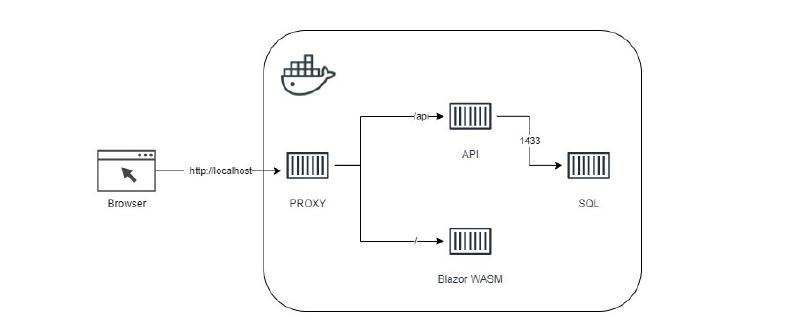
This is a continuation of my previous post, Dockerizing Blazor Wasm Application.
The previous setup looked like this:
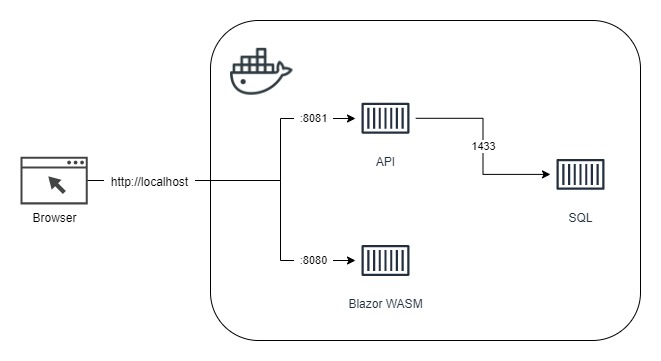
One drawback of that setup was that both the SPA service and the API service had to expose different ports to be reachable. I wanted something cleaner for local development, so I set out to make this work:
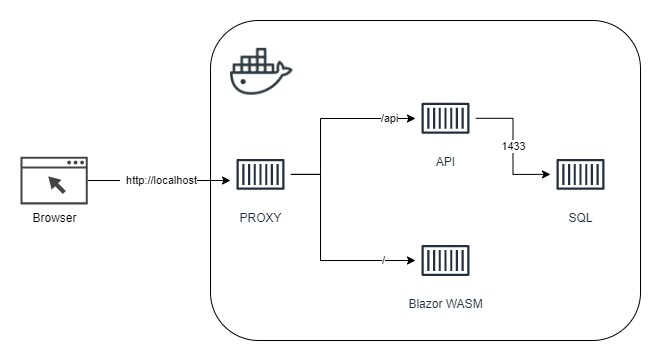
The first task was figuring out how to configure NGINX to forward requests to multiple backend services on the same port. After a fair amount of reading, this is the nginx.conf I ended up with:
 1
 2
 3
 4
 5
 6
 7
 8
 9
10
11
12
13
14
15
16
17
18
19
20
21
22
23
24
25
26
27
28
29
30
31
32
33
34
35
36
37
38
39
40
41
42
43
44
| worker_processes 1;
events { worker_connections 1024; }
http {
sendfile on;
upstream spa-service {
server SPA_SERVICE;
}
upstream api-service {
server API_SERVICE;
}
# https://www.bogotobogo.com/DevOps/Docker/Docker-Compose-Nginx-Reverse-Proxy-Multiple-Containers.php
proxy_set_header Host $host;
proxy_set_header X-Real-IP $remote_addr;
proxy_set_header X-Forwarded-For $proxy_add_x_forwarded_for;
proxy_set_header X-Forwarded-Host $server_name;
server {
listen PORT;
location / {
proxy_pass http://spa-service/;
proxy_redirect off;
}
# https://stackoverflow.com/a/53354944
location ~* /Api/v1\.0/(.*) {
# https://stackoverflow.com/a/8130872
proxy_pass http://api-service/Api/v1.0/$1$is_args$args;
proxy_redirect off;
# https://docs.microsoft.com/en-us/aspnet/core/host-and-deploy/linux-nginx?view=aspnetcore-5.0
proxy_http_version 1.1;
proxy_set_header Upgrade $http_upgrade;
proxy_set_header Connection keep-alive;
proxy_cache_bypass $http_upgrade;
proxy_set_header X-Forwarded-Proto $scheme;
}
}
}
|
The tricky part was making sure only the traffic intended for the SPA service was routed there. I could not get the path directive alone to do what I wanted, so I used regex.
Next, I created a configure-environment.sh script very similar to the previous article:
1
2
3
4
5
6
7
| #!/bin/sh
# replace the placeholders in the nginx congfiguration file
# https://stackoverflow.com/a/23134318
sed -i -e "s|API_SERVICE|${API_SERVICE}|g" /etc/nginx/nginx.conf
sed -i -e "s|SPA_SERVICE|${SPA_SERVICE}|g" /etc/nginx/nginx.conf
sed -i -e 's/PORT/'"${PORT}"'/g' /etc/nginx/nginx.conf
|
The referenced articles cover the configuration details well.
Next, the Dockerfile:
 1
 2
 3
 4
 5
 6
 7
 8
 9
10
11
12
13
14
15
16
| FROM nginx:alpine AS runtime
# copy startup commands
COPY configure-environment.sh /docker-entrypoint.d/
RUN chmod +x /docker-entrypoint.d/configure-environment.sh
# https://www.bogotobogo.com/DevOps/Docker/Docker-Compose-Nginx-Reverse-Proxy-Multiple-Containers.php
COPY nginx.conf /etc/nginx/nginx.conf
ENV SPA_SERVICE=spa:8080
ENV API_SERVICE=api:8080
ENV PORT=8080
EXPOSE 8080
WORKDIR /home/site/wwwroot
|
Finally, the docker-compose.yml to tie it all together:
 1
 2
 3
 4
 5
 6
 7
 8
 9
10
11
12
13
14
15
16
17
18
19
20
| # https://docs.docker.com/compose/compose-file/compose-file-v3/
version: "3"
services:
proxy:
build:
context: .
dockerfile: Dockerfile
image: business/proxy:latest
container_name: business-proxy
environment:
- SPA_SERVICE=spa:8080
- API_SERVICE=api:8080
# https://docs.docker.com/compose/startup-order/
depends_on:
- spa
- api
restart: always
ports:
- 80:8080
|
References:
DOCKER COMPOSE : NGINX REVERSE PROXY WITH MULTIPLE CONTAINERS
Host ASP.NET Core on Linux with Nginx
“proxy_pass” cannot have URI part in location given by regular expression
How can query string parameters be forwarded through a proxy_pass with nginx?
Environment variable substitution in sed